Google Workspace migrations without the downtime
How we move businesses from Microsoft 365, Exchange and shared hosting to Google Workspace with zero downtime and zero data loss.
· 4 min read
Moving your business email and files to Google Workspace shouldn’t mean bounced email, staff locked out of their inboxes or years of messages left behind on the old system. We’ve moved hundreds of businesses to Google Workspace from Microsoft 365, Exchange servers and shared hosting, with zero downtime and zero data loss.
What owners worry about
Most owners we speak to have put off the move for the same reasons:
- “We can’t afford for email to go down, even for an hour.”
- “I don’t want to lose ten years of messages, contacts and shared files.”
- “Nobody on my team has time to babysit a complicated changeover.”
Those are the right things to worry about. Our process keeps your current email working the whole time, does the work in the background and only switches your email over once you’ve confirmed everyone is ready.
How a migration works
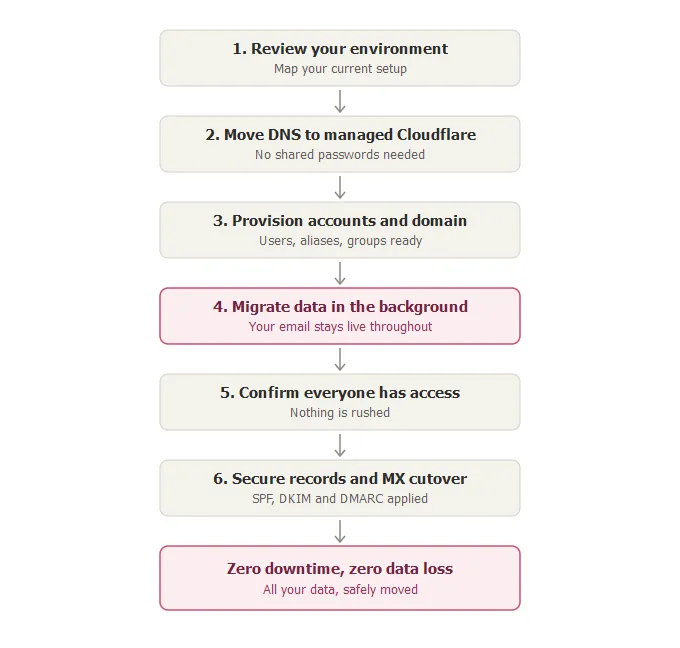
Every migration follows the same nine steps.
1. We look at your current setup
We map your current email provider, your domain settings, mailbox sizes, shared files, group addresses and anything unusual about your setup. Then we plan the move around it before we touch anything.
2. We move your domain settings to Cloudflare
We’re a Cloudflare partner, so we move your domain settings to a Cloudflare account that we manage for you. That makes every later step quicker and safer, and it keeps paying off after the move:
- Nobody has to share hosting passwords or control-panel logins.
- Your website loads faster and gets Cloudflare’s security and bot filtering.
- You get reports on who is sending email as your domain, so we can stop anyone pretending to be you.
3. We connect your domain to Google Workspace
We link your domain to Google Workspace and get the new setup ready. Your current email keeps working, and nothing changes for your team yet.
4. We set up accounts, aliases and groups
We create an account for each person, add their extra email addresses and set up shared addresses like info@ or accounts@, so they all work from the first day.
5. We connect to your old system
We set up a secure link to your current provider, whether that’s Microsoft 365, an Exchange server or a mailbox on shared hosting. If older mail only exists in archive files on someone’s computer, we bring that across too.
6. We copy your data in the background
Email, calendars, contacts and files from OneDrive, SharePoint and Drive copy across while your team carries on working as normal.
7. You check that everyone has access
Every person signs in and checks that their email and files are there. We only switch over once you’re happy the team is ready.
8. We protect your email
Before the switch, we add the settings that stop other people sending email as you and keep your messages out of spam folders. This is part of every migration, at no extra cost.
9. We switch your email over
On the day we agree with you, new email starts arriving in Google Workspace. Everything from the old system is already there.
What we bring across
- Email, with folders and history
- Calendars, including recurring events
- Contacts
- Files from OneDrive and Google Drive
- SharePoint document libraries
- Shared mailboxes
- Aliases and group addresses
Why businesses move with us
- Hundreds of migrations done. We’ve moved businesses off Microsoft 365, Exchange servers and shared hosting, so we know what to check before we start.
- No downtime. Your current email keeps working until the switch-over date you’ve agreed to.
- A local team. You deal with people in South Africa, in English or Afrikaans.
- One invoice. Google Workspace licences, your domain, the migration and ongoing support, billed locally.
What it costs
Every migration is different, so we quote each one on how many people you have, how much data there is and where it lives now. You get a fixed quote before we start, with no surprises later.
Sign up for Enhanced Support and we waive the migration fee.
For your IT person
We move DNS to Cloudflare, migrate from Microsoft 365, Exchange or IMAP mailboxes (PST archives included), set up SPF, DKIM and DMARC reporting, and do a planned MX cutover once every user has confirmed access.
Ready to move?
Tell us what you use today and how many people you have. We’ll map out how your migration would run and send you a fixed quote.